11 Album Download Sites and Apps: Legal MP3, FLAC, and ZIP Options [2026]

Summary: Compare 11 album download sites, archives, apps, and desktop workflows by authorization, full-album availability, file type, and limitations. The guide also explains safe ZIP downloads, MP3 versus FLAC, audio-quality checks, Android offline access, and practical library organization.
Table of Contents
Looking for album download sites usually means you want a complete release, not a playlist that disappears outside an app. The catch is that an album ZIP download, separate local tracks, a paid digital release, and app-only offline listening are four different results.
![11 Album Download Sites and Apps: Legal MP3, FLAC, and ZIP Options [2026]](https://images.dvdfab.cn/artifact/2026/07/22/73pkdAxUPxUgrlAysKjv97FyQVhf_BRp/feature_cover.jpg)
This guide shows where to download albums from authorized sources, how delivery types differ, and how to check MP3 or FLAC quality before adding files to a local library. It also separates websites to download albums from mobile apps and desktop workflows.
Top 11 Sites to Download Full Albums
The options below keep the established list order while separating archives, artist catalogs, sample libraries, apps, and desktop tools. Not every entry commonly provides a complete album, and so-called zip music download sites should be judged release by release.
1. Free Music Archive (FMA)
- Source type: curated music website.
- Authorization basis: licenses displayed for individual works or releases.
- Delivery: downloadable local tracks when enabled; full-album packaging varies.
- Typical format: commonly MP3 or release-specific files.
- Best fit: discovering indie and open-licensed music.
- Not ideal for: finding a specific mainstream album or assuming every release includes a ZIP.
2. Jamendo
- Source type: independent-music platform.
- Authorization basis: artist-uploaded music with platform and license terms.
- Delivery: local downloads where offered; album availability and permitted use vary.
- Typical format: release-dependent digital audio.
- Best fit: independent music discovery.
- Not ideal for: treating personal listening access as a blanket commercial-use license.
3. Musopen
- Source type: classical-music and educational archive.
- Authorization basis: public-domain status or item-level rights information.
- Delivery: local recording downloads; complete collections depend on the item.
- Typical format: recording-specific audio files.
- Best fit: classical works and public-domain research.
- Not ideal for: current pop catalogs or remix-focused browsing.
4. FreeSound

- Source type: collaborative sound library.
- Authorization basis: Creative Commons licenses attached to uploaded sounds.
- Delivery: separate samples and effects, not commonly full albums.
- Typical format: file types vary by upload.
- Best fit: sound design, field recordings, and reusable samples.
- Not ideal for: listeners seeking a conventional full album download.
5. Internet Archive
- Source type: digital archive.
- Authorization basis: item-level public-domain, Creative Commons, uploader, or collection terms.
- Delivery: separate tracks or bundled downloads when provided.
- Typical format: mixed audio formats and ZIP packaging that vary by item.
- Best fit: live recordings, community audio, and older releases.
- Not ideal for: assuming every uploaded item has identical rights or file options.
6. SoundClick
- Source type: artist music platform.
- Authorization basis: artist-controlled availability and release terms.
- Delivery: local track downloads where a download control appears; full albums are release-dependent.
- Typical format: listing-specific digital audio.
- Best fit: independent artists and genre browsing.
- Not ideal for: expecting every streamable track to be downloadable.
7. YouTube Music (Premium In-App)

- Source type: subscription streaming app.
- Authorization basis: official offline access under the account and service terms.
- Delivery: app-only offline playback rather than ordinary MP3 album files.
- Typical format: service-managed offline data.
- Best fit: convenient mobile listening within YouTube Music.
- Not ideal for: a portable local-file library or album ZIP download.
8. Audiomack
- Source type: music streaming app.
- Authorization basis: artist or platform availability for offline listening.
- Delivery: app-managed offline playback for eligible music, not generally exposed as ordinary local tracks.
- Typical format: service-managed offline data.
- Best fit: mobile offline listening.
- Not ideal for: moving files to another player or organizing them as a desktop library.
9. Bandcamp
- Source type: artist storefront and app.
- Authorization basis: artist or label-controlled free, name-your-price, or paid release.
- Delivery: downloadable local files for eligible releases, often as a complete album.
- Typical format: options depend on the release.
- Best fit: supporting artists while receiving an authorized digital album.
- Not ideal for: expecting every album to be free.
10. dig.ccMixter
- Source type: Creative Commons music discovery site.
- Authorization basis: track-level licenses and attribution terms.
- Delivery: local tracks and compilations where offered; complete album packaging varies.
- Typical format: listing-specific downloads.
- Best fit: remixes, creator projects, and licensed tracks.
- Not ideal for: mainstream commercial albums or assuming one license covers an entire compilation.
11. Audionautix
- Source type: royalty-free music catalog.
- Authorization basis: the site's stated license and attribution conditions.
- Delivery: individual local tracks rather than a broad catalog of commercial albums.
- Typical format: downloadable audio supplied by the site.
- Best fit: background music for projects under the stated terms.
- Not ideal for: searching for current artist albums.
For ordinary album collecting, artist storefronts are the clearest route to artist-authorized local files, archives are strongest for historical or openly licensed material, apps favor convenience, and sample libraries should not be mistaken for album catalogs.
Desktop Album Downloads with MusicFab All-In-One
A desktop music album downloader can suit listeners who need an authorized local-file workflow rather than official app-only offline access. For content you're authorized to access, where permitted by platform terms and applicable law.
MusicFab is a third-party desktop tool relative to music services' official offline feature. It supports batch handling for songs, playlists, and albums, selectable MP3, FLAC, or WAV output, and retained lyrics and ID3 tags. Its free trial supports three song downloads on each supported service.

- Download music from 10+ platforms such as Spotify, Amazon Music, Apple Music, and others.
- Convert audio to MP3, M4A(AAC), WAV, FLAC or OPUS and more.
- Batch download songs,alubms,playlist,podcasts and audiobooks at 20X faster speed.
- Search and download music all in MusicFab, no extra app required.
- Keep ID3 tag and lyrics for music library management.
Step-by-Step Guide to Download Albums via MusicFab
- Install and open MusicFab. Launch the application on Windows or Mac and confirm the output folder before adding music.
- Choose the Platform. Open the supported-service list and select the service. As a example, choose YouTube Music here.
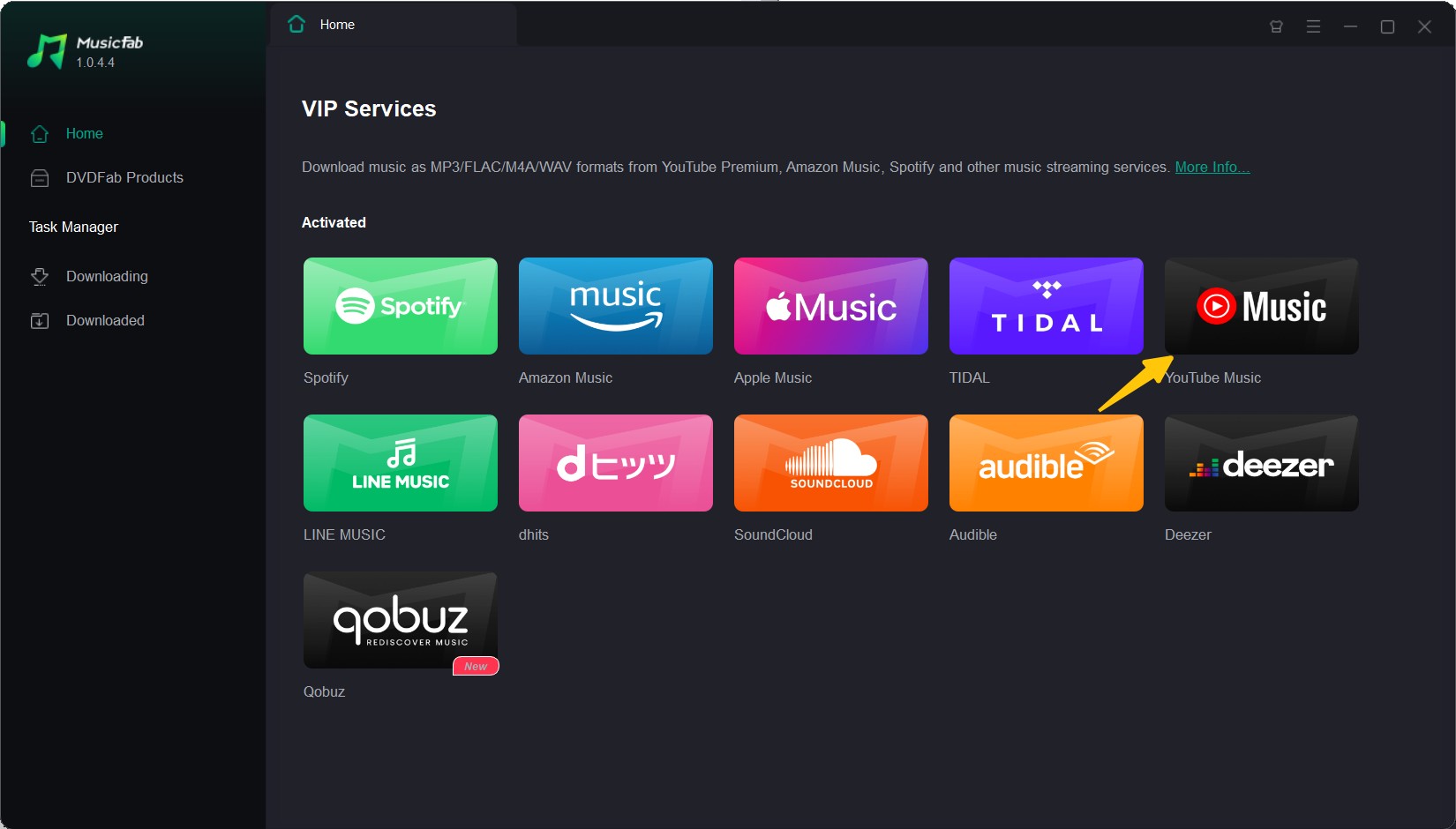
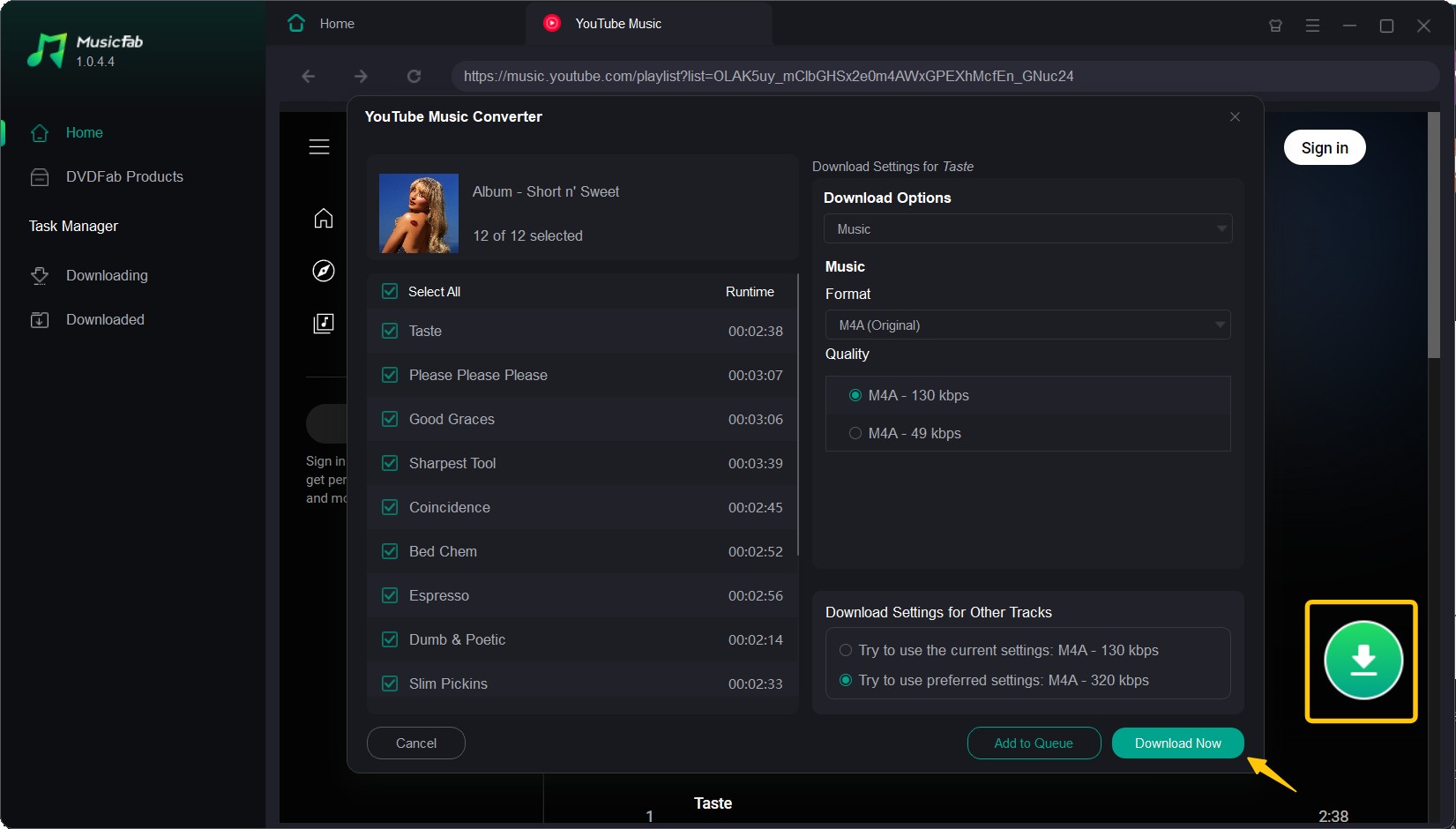
- Select the album and settings. Open the authorized album, choose the available format and quality settings, and review the track list before adding the batch.
- Start the download and locate the files. Begin the batch, then open the chosen output folder after processing completes.
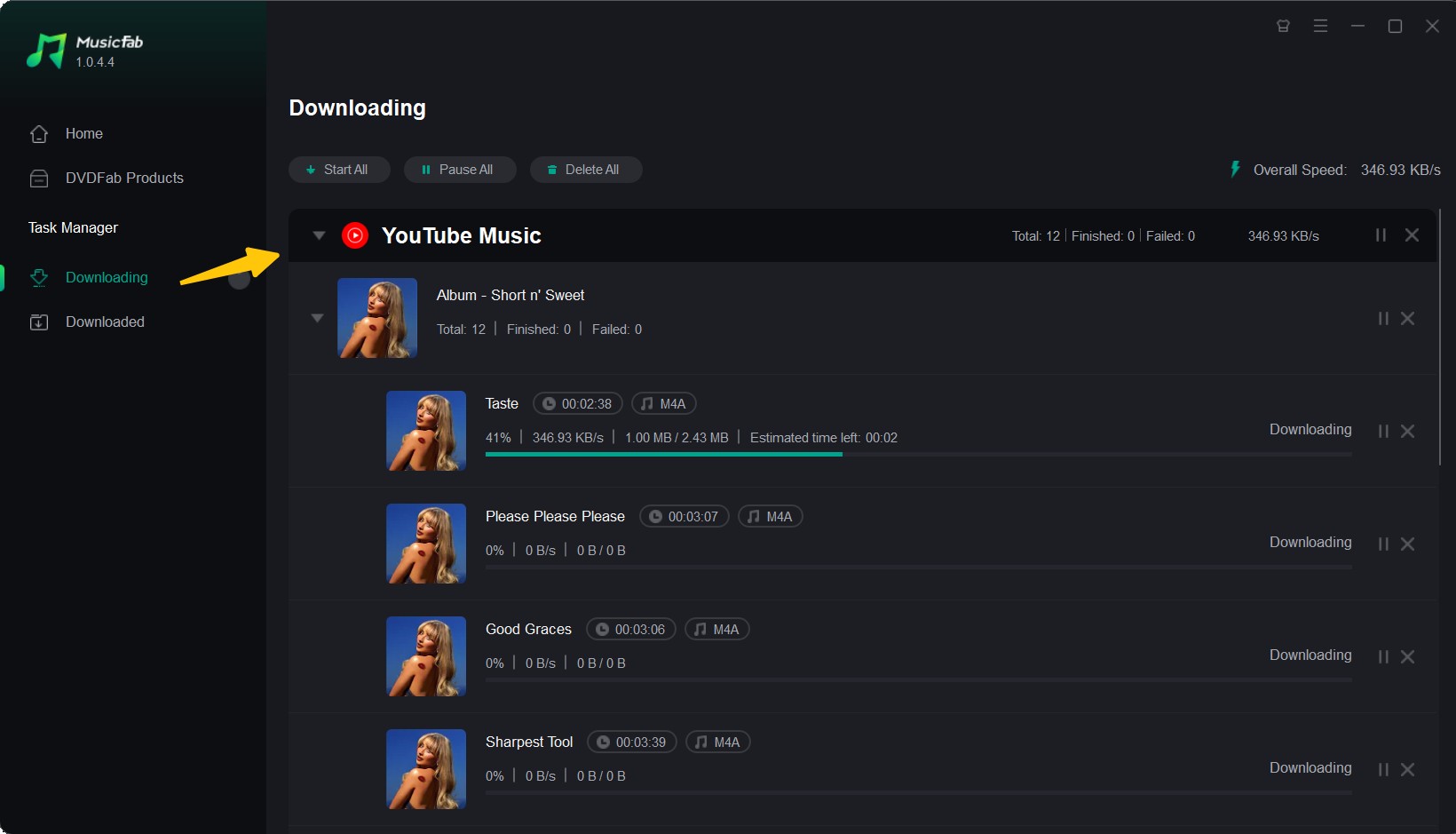
I would set the format, track numbering, and metadata options before the batch starts. That decision takes seconds and prevents much more cleanup when several albums enter the same library.
Local Files, ZIP, or App Offline
The table below separates source type, authorization, album availability, delivery, and limitations. Service catalogs and account requirements are summarized as of July 2026.
| Option | Source type | Authorization basis | Full-album availability | ZIP or separate tracks | Local files or app-only | Typical formats | Account required | Best fit | Main limitation |
|---|---|---|---|---|---|---|---|---|---|
| Free Music Archive | Curated website | Item or release license | Sometimes | Usually separate tracks; packaging varies | Local files when enabled | Commonly MP3 or release-specific | Depends on action | Open-licensed indie discovery | Mainstream catalog is limited |
| Jamendo | Independent-music platform | Artist upload and stated license | Sometimes | Release-dependent | Local downloads where offered | Release-dependent audio | May be required | Independent artists | Use rights vary by license |
| Musopen | Classical archive | Public-domain or item rights | Sometimes | Usually separate recordings | Local files | Recording-specific audio | May be required for some access | Classical and public-domain works | Not a current pop catalog |
| Internet Archive | Digital archive | Item-level rights information | Often for suitable collections | ZIP or separate files when supplied | Local files | Mixed; varies by item | Usually not for basic downloads | Live, community, and older audio | Rights and file options vary by item |
| Bandcamp | Artist storefront | Artist or label-controlled release | Common for eligible releases | Album package or separate tracks | Local files; app playback also available | Options vary by release | Depends on purchase or download flow | Artist-authorized albums | Not every release is free |
| YouTube Music | Streaming app | Official subscription offline feature | Yes when eligible | Neither as ordinary files | App-only offline | Service-managed data | Yes, with eligible access | Convenient mobile listening | No ordinary local audio files |
| Audiomack | Streaming app | Artist or platform-enabled offline access | For eligible releases | Neither as ordinary files | App-only offline | Service-managed data | App account may be needed | Phone-first offline listening | Offline items stay in the app |
| MusicFab | Desktop tool | Authorized user workflow under applicable terms | Batch album handling | Separate local tracks | Local files | MP3, FLAC, or WAV | Service sign-in may be needed | Authorized batch-library workflow | Desktop setup; unnecessary for free archives |
My practical verdict: choose an artist storefront or archive for straightforward authorized local downloads, an app for convenience, and a desktop workflow only when local batch organization is the actual requirement.
When Free Full-Album Downloads Are Legal
You can download albums free of charge when the artist, label, rights holder, or platform clearly authorizes the release. A legal full album download may come from a public-domain archive, a Creative Commons catalog, an artist-approved giveaway, a name-your-price page, or a digital purchase.
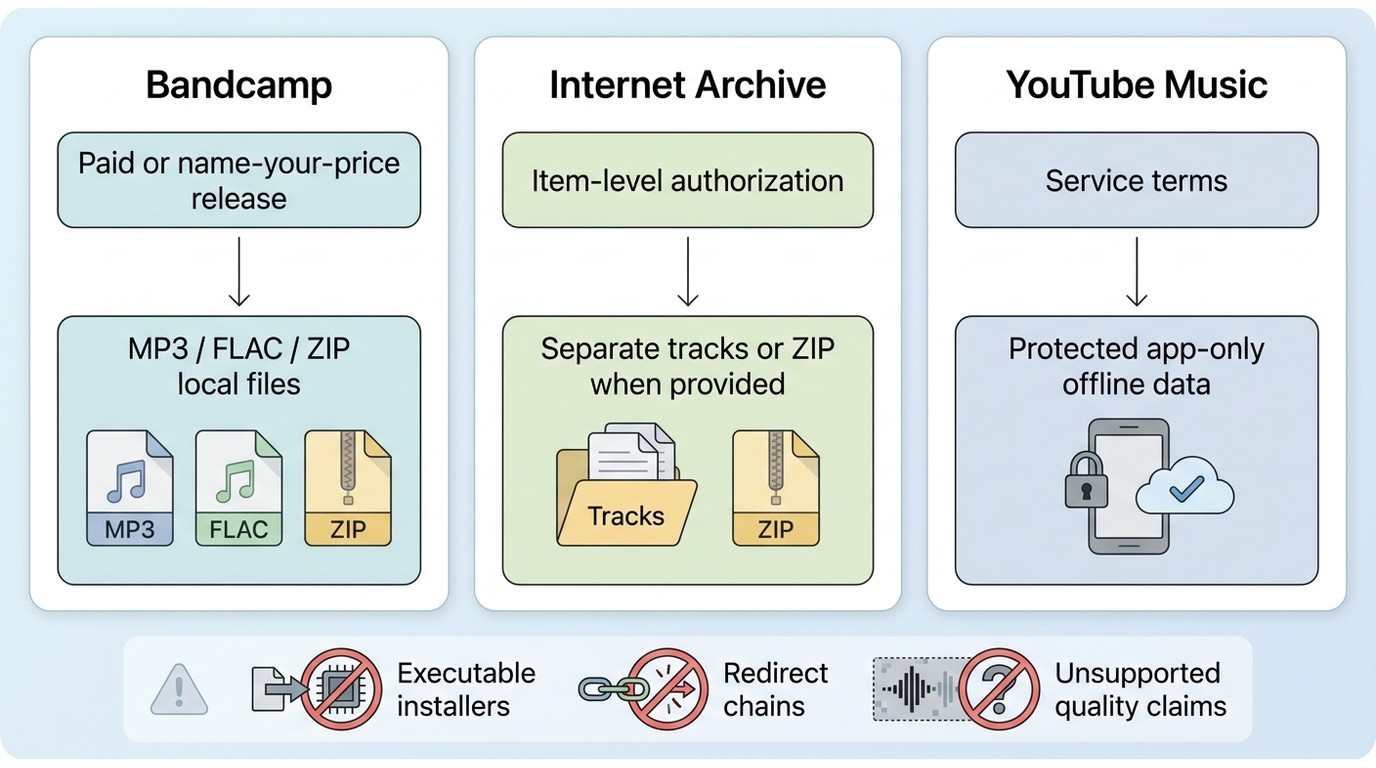
Authorized Free Sources
Reliable websites to download albums state why the music is available. Look for a visible license, public-domain status, artist permission, label approval, or a purchase option. A familiar site name alone does not establish permission for every upload.
- Public-domain archives: recordings whose rights status permits downloading and reuse under the stated conditions.
- Creative Commons catalogs: music released under a license that defines permitted use and any attribution requirement.
- Artist storefronts: free, name-your-price, or paid releases controlled by the artist or label.
- Streaming apps: offline access authorized for playback inside the app, not necessarily an ordinary audio file.
My rule is simple: explicit authorization matters more than a large “free” badge.
What You Actually Receive
An album download link can deliver a ZIP archive, separate MP3 or FLAC tracks, a paid download, or protected offline data that works only in an app. Check the delivery type before assuming you will receive music zip files or files you can move between players.
- Full ZIP package: one compressed folder containing the available tracks and sometimes artwork or metadata.
- Separate local tracks: individual audio files downloaded one at a time or as a batch.
- Purchased digital release: local files supplied under the store's purchase terms.
- App offline mode: downloaded data managed by the service and played inside its app.
Five Checks Before You Download
Before using MP3 album download sites, confirm both authorization and delivery. These five checks filter out most misleading pages without requiring technical expertise.
- Confirm that the artist, label, rights holder, or platform authorizes the release.
- Read the visible license, public-domain notice, free-release terms, name-your-price status, or purchase terms.
- Avoid a page that forces an executable installer when it claims to offer ordinary audio or ZIP files.
- Leave redirect chains that repeatedly open unrelated pages instead of the promised album download link.
- Treat “320 kbps” and “lossless” as claims to verify, not proof of source quality.
A transparent license and a clear delivery method are stronger trust signals than the word “free.”
Album Download Steps by Source and Device
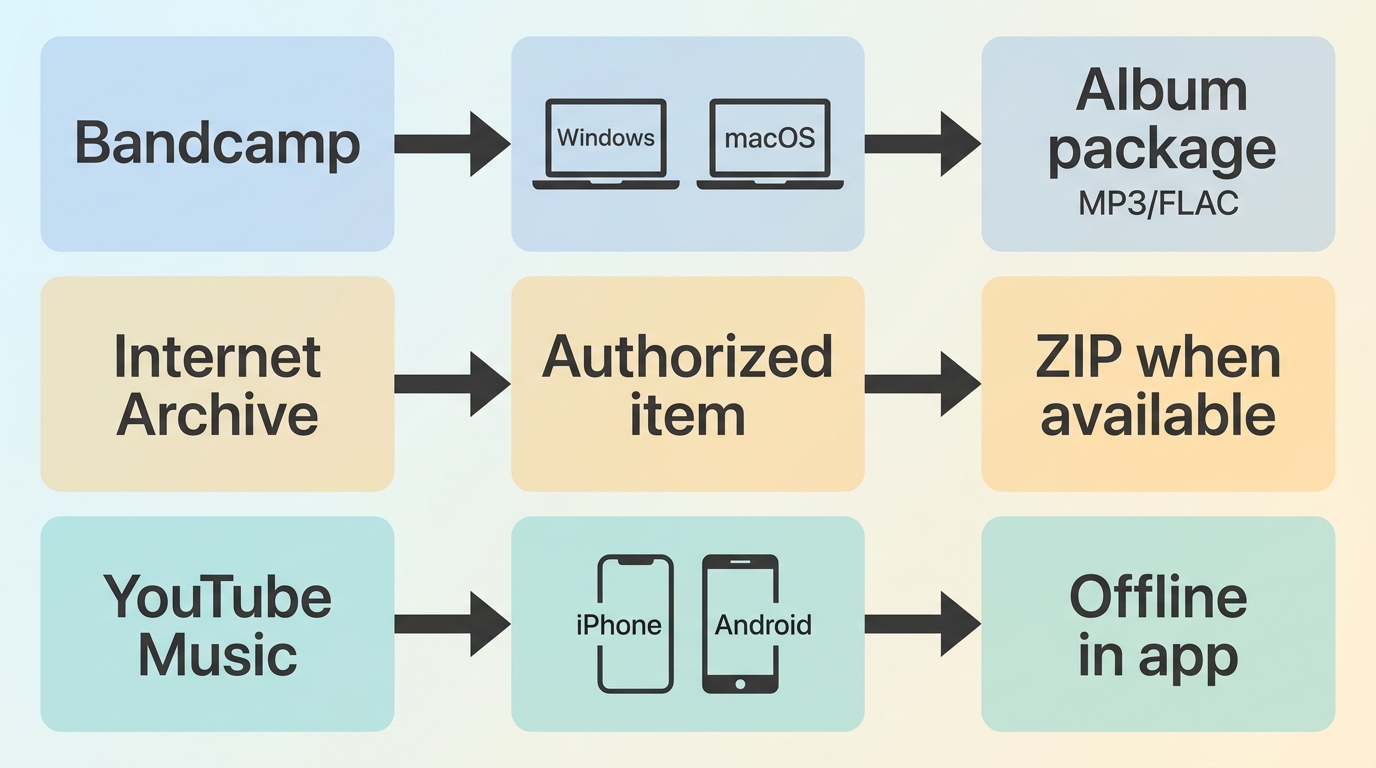
The right steps depend on whether you download albums online from an artist storefront, an archive, or a music album download app. Confirm the expected result first: local tracks, a ZIP package, or playback that stays inside the app.
How to download albums on desktop?
Bandcamp is a clear desktop example because the artist controls whether an album is free, name-your-price, or paid.
- Open the album page and confirm that it shows “Free Download,” “Name Your Price,” or a purchase option.
- Select the digital album and enter an allowed amount when the artist permits a zero-price download.
- Choose one of the formats offered for that release, download the package, and extract it if it arrives as an archive.
This route fits listeners who want an authorized release and ordinary local files. It does not guarantee that every Bandcamp album is free.
Authorized ZIP Downloads
Internet Archive can provide an authorized album ZIP download when the item page includes suitable rights information and a bundled option. Availability, formats, and packaging differ by item.
- Search Audio collections and open the exact release or recording page.
- Read the item-level rights statement, license, public-domain note, or uploader information.
- Review the download choices and confirm which formats and tracks are included.
- Select the ZIP option when available, save it, and extract the archive into a dedicated album folder.
- Check track order, filenames, artwork, and metadata before merging the files into your main library.
This is one of the more practical routes for music zip files, especially live or historical recordings, but the item page must support the rights and package you need.
Album Apps on Android
A music album download app such as Audiomack may let Android users save eligible albums for offline playback, but the content generally remains managed inside the app rather than appearing as normal MP3 files.
- Open the album and confirm that an offline or download control is available.
- Save the eligible release while connected to Wi-Fi or mobile data.
- Open the app's offline library to confirm that the tracks are available without a connection.
- Use the app's storage settings to manage space or clear offline items.
This workflow fits phone-first listening. It is not the right choice if you need files visible in Android's ordinary Music folder or transferable to another player.
MP3, FLAC, and Real Audio Quality
Free MP3 album downloads use less storage and play on more devices, while FLAC preserves lossless audio when the source is genuinely lossless. The extension and advertised bitrate are not enough to prove quality.
MP3 or FLAC for Your Library
MP3 is lossy, so it trades some audio detail for smaller files and broad compatibility. FLAC is lossless, uses more storage, and can retain the source audio without lossy compression. Both can carry album, artist, track number, and artwork metadata when tagged correctly.
- Choose MP3 when storage, car playback, or broad device compatibility matters most.
- Choose FLAC when the source is lossless and preserving that quality matters more than file size.
- Check metadata because a technically good file with broken track numbers or missing album tags still creates a poor library experience.
If you need a deeper source-and-tool comparison, the existing FLAC downloader guide covers that narrower intent; here, the practical choice is format, verified source quality, and usable metadata.
Verify 320 kbps and Lossless Files
A file labeled 320 kbps or FLAC may have been converted from a lower-quality source. Verification cannot restore lost detail, but it can expose mismatches between the label and the audio data.
- Open the file properties and check codec, sample rate, bit depth where applicable, channel count, and declared bitrate.
- Use a trusted media-information or spectrum-analysis tool to inspect the encoding and frequency content.
- Compare several tracks from the same release; inconsistent cutoffs or properties can indicate mixed sources.
- Listen for obvious swirls, smeared high frequencies, clipping, or sudden loudness changes.
- Keep the original download package until tags, artwork, and audio checks are complete.
I trust a clearly authorized source and consistent file analysis more than the largest number printed on a download page.
FAQs
Can an album converter be legal to use?
It can be, but legality depends on the source, your authorization, the intended use, platform terms, and applicable law. A music album downloader used for content you are allowed to access is not the same as obtaining music without permission. Keep the workflow personal, respect the stated rights, and do not redistribute files.
Why does a download show the wrong bitrate?
The filename or tag may report the target setting used during conversion, not the quality of the original source. Check file properties and inspect the audio with a media-information or spectrum tool. A 320 kbps label cannot recreate detail already lost in an earlier encode.
Do Android album apps save local files?
Many do not. They store offline data for playback inside the music album download app, so the album may not appear in the device's normal Music folder. Authorized download websites are more likely to provide ordinary files you can organize locally.
How should downloaded albums be organized?
Use a consistent structure such as Artist/Year - Album, then name tracks with leading track numbers. Verify album artist, title, disc number, artwork, and ID3 tags before moving the release into the main library. Consistent duplicate handling matters as much as the folder name when you download music albums regularly.
Conclusion: Choosing the Right Album Download Option
When deciding where to download albums, confirm authorization first; identify whether you will receive local tracks, an album ZIP download, a purchase, or app-only access; then choose the format and quality your library needs.
Artist-authorized stores and archives are the safer default for ordinary downloads. App offline mode suits convenience without file management. A desktop local-file workflow suits authorized batch-library needs when format selection, tags, and folder organization matter. The right source is the one whose permission and delivery type match your actual goal.


In this article, I will share my personal MusicFab review, analyzing its features, pros and cons, user feedback, recently update and roadmap.
By Jane Chen - Sep 22, 2026
Apple Music offers a higher lossless ceiling and Dolby Atmos, while Spotify combines 24-bit/44.1 kHz FLAC with Connect and discovery strengths. This guide compares specs, device paths, settings, a fair listening protocol, switching trade-offs, and an optional authorized local-file workflow.
By Jane Chen - Aug 26, 2026
Choose a K-pop download method by file ownership, rights status, source quality, and batch needs. This guide compares MusicFab, licensed purchases, owned CD rips, creator-authorized catalogs, desktop tools, and unverified archives, with practical MP3-versus-FLAC guidance and four legal-use FAQs.
By Jane Chen - Aug 13, 2026
Podcast downloads fall into two categories: app-managed offline copies and portable audio files. This guide covers free publisher and RSS links, current iPhone and Android app workflows, bulk and retention limits, a platform comparison, and an authorized MusicFab desktop workflow for saving local files.
By Jane Chen - Aug 13, 2026