
SoundCloud Downloader Chrome Extension vs Desktop App

Summary: Chrome extensions work well for occasional authorized SoundCloud tracks, but desktop apps offer a more controlled workflow for playlists, formats, and metadata. This guide compares the routes, limits, and best-fit scenarios.
A SoundCloud downloader Chrome extension is convenient for occasional authorized tracks, but its availability can change with browser-store rules, permissions, or SoundCloud updates. For playlists, format control, and dependable metadata, a maintained desktop app is usually the better fit.
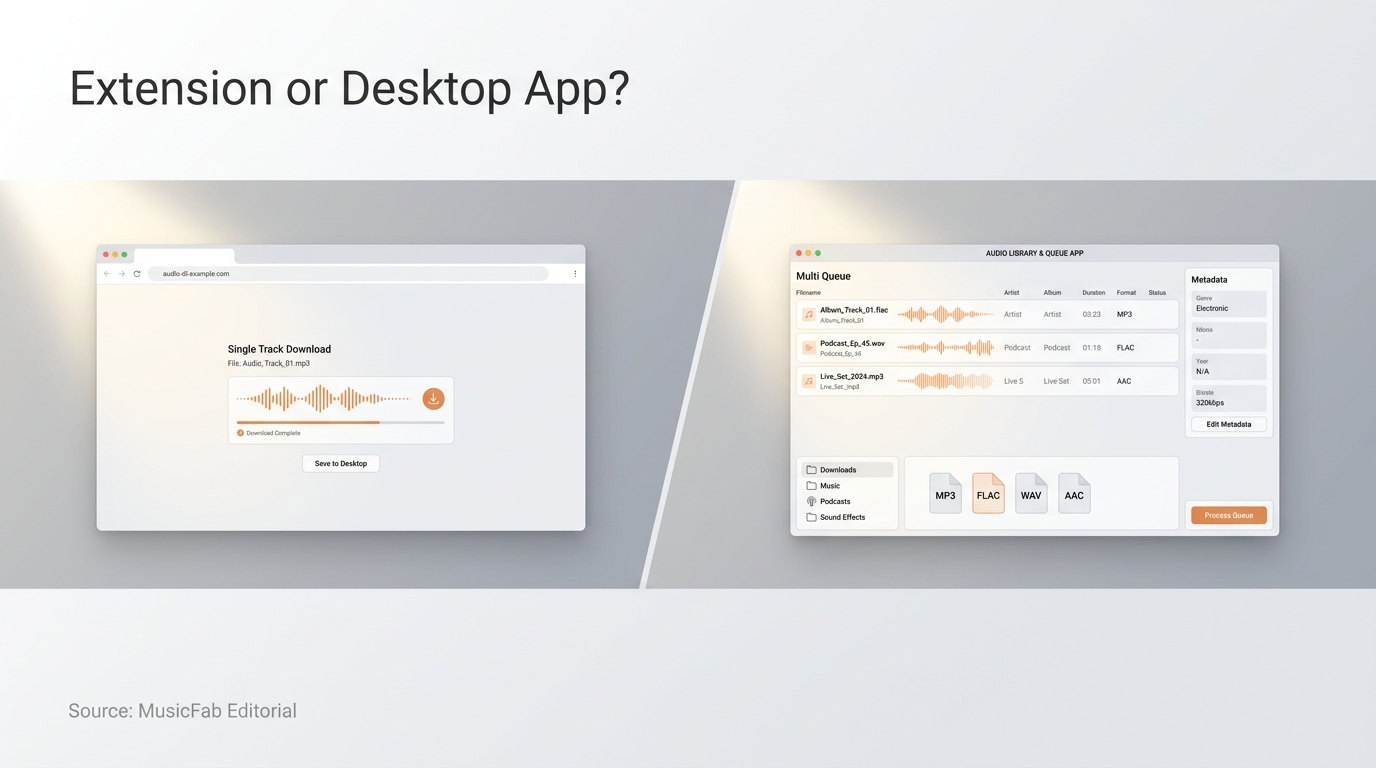
The annoying part is not choosing a download button; it is discovering that yesterday's working route has vanished or lost access. I treat browser extensions as convenience tools, not library infrastructure. That distinction matters when the job grows from one artist-approved track to a playlist, a DJ folder, or thousands of likes. Below, I compare the active browser routes, a responsible workflow, the quality traps, and the point at which a desktop SoundCloud playlist downloader makes sense.
SoundCloud Downloader Chrome Extensions: What Still Work
US users can currently choose between direct Chrome Web Store extensions, CrossPilot-mediated packages, online converters, and installed desktop software. A direct store extension is the simplest browser route, but the right choice depends on batch size, permissions, file controls, and how much disruption you can tolerate when a listing or interface changes.
Please note: Third-party downloaders may conflict with SoundCloud's Terms of Use. Use them only for your own uploads or material you are authorized to save, and do not redistribute the files. When an artist enables SoundCloud's own Download file option, use that first.
Route Output and Batch Sign-In Handling Pros Cons SoundCloud Track Downloader Format, quality, 200+ job claim Public tracks may need none Direct store install Listing-dependent behavior SoundCloud Enhanced Pro MP3, Opus, 10-track claim Public tracks may need none Tags and artwork Smaller batch cap Addoncrop via CrossPilot MP3, tags, playlist claims Extra browser permissions Broad page scope Added dependency Online converter Usually MP3 selection Often URL-only No extension install Privacy, ads, quality vary
The practical takeaway is simple: a store badge reduces setup friction, but it does not prove source quality, long-term maintenance, or a trustworthy permission model.
Direct Chrome Web Store Options
SoundCloud Track Downloader advertises inline and popup downloads, format controls, queue recovery, and large background jobs. SoundCloud Enhanced Pro advertises MP3 or Opus output, ID3 data, cover art, history, and smaller selected-track batches. Those are useful distinctions, but they are listing claims rather than a promise that every SoundCloud page will behave the same way.
Test either direct extension in this order:
- Install it only from its current store page.
- Read the permissions and privacy disclosure.
- Open one authorized track and use the advertised control.
- Inspect the saved file before adding more work.
Best for: occasional browser-first use.
Not ideal for: a carefully organized archive that cannot absorb a broken queue or missing tags.
CrossPilot and Userscript Installation Routes
CrossPilot can act as a bridge for packages that are not installed as a normal Chrome Web Store extension. That adds another component, another permission surface, and another maintenance dependency. It is not automatically unsafe, but it deserves more scrutiny than a direct store install.
If you use this route:
- Review CrossPilot's permissions.
- Review the downloader package separately.
- Run one public or authorized track.
- Remove either component if its behavior does not match the stated purpose.
Best for: a specific feature unavailable in a direct listing.
Not ideal for: anyone who wants the least possible browser access.
Firefox, Opera, and GitHub Availability
A Chrome listing does not automatically become a Firefox extension. Opera may accept some Chromium packages, but store availability and actual page behavior can still differ. A GitHub repository can provide code visibility, yet it also shifts update checks, packaging, and installation judgment to you. Treat browser compatibility as product-specific, not portable by default.
Extension, Online Converter, or Desktop App
- Choose SoundCloud's artist-enabled download for one authorized track when it is available.
- Choose a direct Chrome extension for occasional tracks and a browser-native workflow.
- Choose a reputable SoundCloud to MP3 service for a no-install, one-off conversion, while checking the resulting file rather than trusting the bitrate label.
- Choose a desktop app for full playlists, repeat jobs, format choice, and metadata-sensitive folders.
That is my core verdict: extension convenience is real, but it stops being economical once you spend more time repairing the workflow than saving the music.
How to Download SoundCloud Music Responsibly
Before saving a SoundCloud track, confirm that you own it, the artist enabled the download, or the rights holder gave permission. Then check storage, choose a destination, save a small sample, and verify the file before starting a playlist or library job.
Prerequisites: Permission, Access, Storage, and File Destination
Have these basics ready before opening a downloader:
- Authorization to save the track for personal use.
- Legitimate access to any account-restricted material.
- Enough local storage for the planned tracks or playlist.
- A known browser or app download folder.
- A player that supports the selected output format.
Terms-of-service risk and copyright risk are related but different. An unauthorized client may violate platform terms, while sharing or selling files can create a separate copyright problem. Personal-copy rules also vary by jurisdiction, so permission should lead the tool choice, not follow it.
Use the Artist-Enabled Download First
When a creator permits downloads, SoundCloud can show Download file under the track's More menu. That route is the cleanest because the creator controls whether the file is offered and may provide a file that differs from the streamed version. If the button is missing, do not assume a hidden extension button creates permission.
Follow a Four-Step Tool Workflow
For material you are authorized to save, use this sequence:
- Choose the route that fits the job: official download, direct extension, online converter, or desktop app.
- Open the authorized track or paste its URL into the selected tool.
- Select the available format and quality, then choose the destination folder.
- Save the file and locate it before adding more tracks to the queue.
The order matters. Picking a tool first and asking about rights or file behavior later is how a one-click task turns into a messy library problem.
Verify the File Before Building a Library
Play the entire sample track, not just its opening seconds. Confirm the filename, title, artist, artwork, track number, and playback compatibility. If the first file lands in the wrong folder or loses its tags, a hundred-file queue will multiply that error; fix the workflow while the cleanup is still small.
How a SoundCloud Playlist Downloader Handles Large Libraries
A true SoundCloud playlist downloader creates and manages a queue; it does not merely repeat a single-track click behind the scenes. For a large library, the deciding features are failure recovery, track order, duplicate handling, metadata, and a clear way to resume interrupted work.
Scope the Library Before Starting
Define what you are actually saving: one playlist, an album, a likes collection, an artist page, or your own uploads. Decide the destination folder, naming pattern, duplicate rule, output format, and whether playlist order matters. Storage is part of the plan, especially when moving from compact lossy files to WAV or FLAC.
The scale can become extreme. A Reddit poster in r/SoundCloud asked, "I need help downloading 5k+ liked songs from my SoundCloud to my computer or usb in mp3 format. Any suggestions??" At that size, the download button is the least interesting part of the system.
If your goal is broader than a short list, compare queue behavior in a focused SoundCloud playlist downloader overview before committing your whole collection.
True Batch Queues vs Repeated Single-Track Actions
Real batch support should discover multiple tracks, let you review the queue, and process it without requiring the same click on every item. A small selection cap can still be useful, but it is not equivalent to playlist-scale operation. The same caution applies to a claimed playlist ZIP: confirm that the tool preserves filenames, order, and tags in a pilot batch.
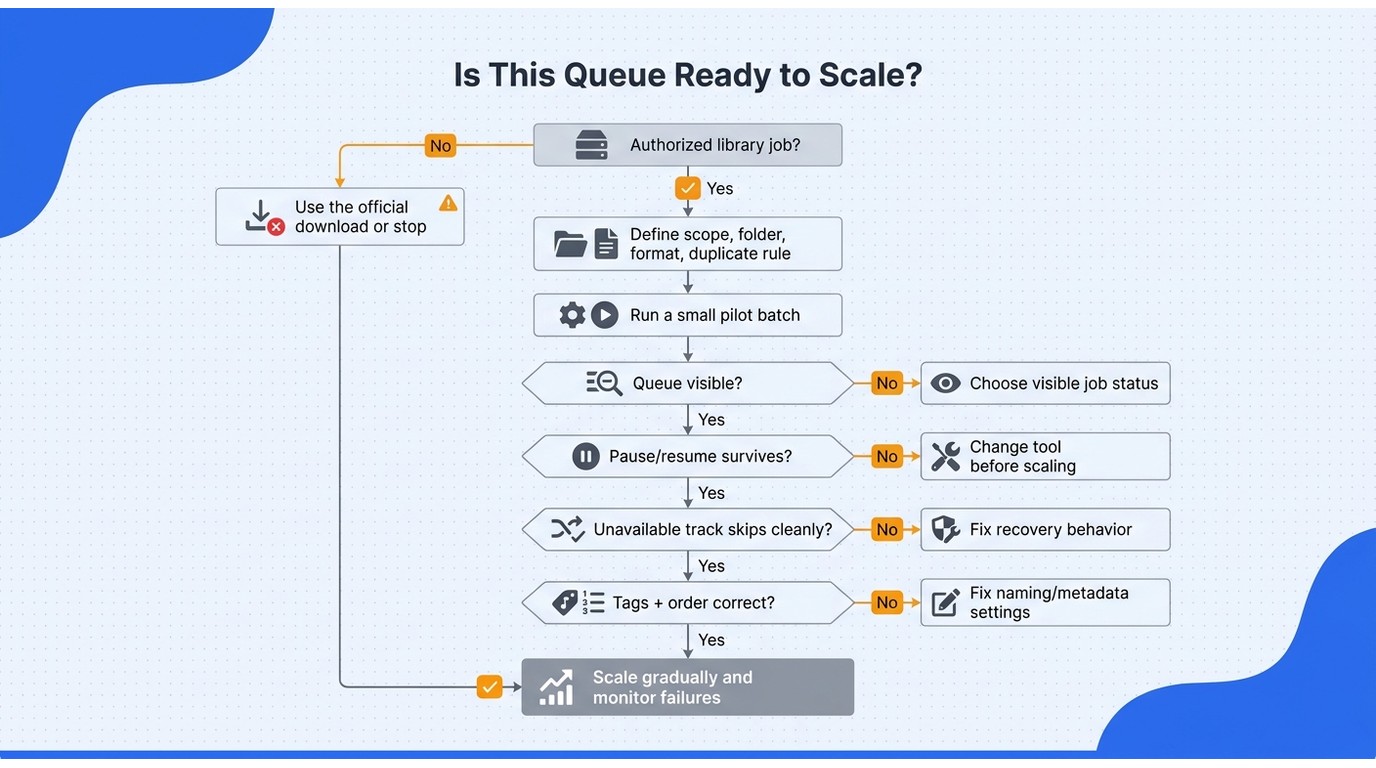
My standard is operational, not promotional. If a tool cannot show what is queued, what failed, and what remains, I do not count its "batch" checkbox as library-grade.
Large-Queue Limits, Recovery, and API Failures
Large jobs can fail because a service changes access, a browser tab sleeps, the network drops, or a product reaches its own queue or request limit. A resilient workflow should expose failed tracks, avoid redownloading completed items, and let you resume without rebuilding everything.
Start with a small pilot batch. Pause it once, restart the browser or app, and confirm that the queue state survives. Then test a deliberately unavailable track to see whether the entire job stops or skips cleanly.
Best for large libraries: a visible queue with per-track status and recovery.
Not ideal: a page full of download buttons with no shared job state.
Preserve Track Order and Library Metadata
Metadata is what turns a pile of audio files into a usable library. One r/DataHoarder poster described the exact failure: "I think i have an issue with the metadata not being added to whatever i am downloading with scdl (to download soundcloud songs) or yt-dlp. I want to keep the tracks in the right order when downloading playlists."
Audit the first batch for title, artist, album, artwork, track number, filename pattern, folder structure, and playlist order. Check duplicates too. A downloader that preserves audio but scrambles context creates manual work that grows faster than the queue.
Match the Workflow to the Scenario
- Occasional listening: use the creator-enabled download or a direct extension.
- Travel preparation: use a small, verified batch and confirm playback on the destination device before leaving.
- DJ organization: prioritize consistent filenames, tags, artwork, and playlist order; separately confirm that your planned performance use is authorized.
- Long-term personal archive: prioritize recoverable queues, duplicate control, format choice, and a folder structure you can migrate.
This is where I draw the line: a short playlist is a download task, while thousands of tracks are a data-management project.
What 320 kbps, Lossless, and Metadata Claims Really Mean
When a SoundCloud downloader 320kbps option is selected, it still cannot create audio detail that is absent from the source. A 320 kbps setting or a lossless container describes the output process, not automatic proof that the source contained equivalent fidelity; format, source quality, and metadata must be checked separately.
Source Quality Sets the Ceiling
Converting a lower-quality source to a 320 kbps MP3 increases the output bitrate, but it does not reconstruct discarded detail. Likewise, putting decoded audio into FLAC or WAV can prevent another lossy encode without turning the original stream into a higher-resolution master.
That is why I distrust quality labels without a file check. The useful question is not "Does the menu say 320 kbps?" It is "Did this workflow preserve the best authorized source available without adding avoidable loss?"
Choose MP3, M4A, WAV, FLAC, or OPUS by Use Case
MP3 offers broad playback support. M4A with AAC can deliver efficient files for modern devices. WAV is straightforward for editing but uses more storage, while FLAC preserves decoded audio without lossy recompression and keeps file sizes below uncompressed WAV in many cases. OPUS is efficient, though some older players and DJ hardware may not support it.
For editing or archival decisions, a dedicated SoundCloud to WAV comparison can help separate container choice from source-fidelity claims.
Metadata Is Part of File Quality
A technically valid file can still be poor library material if the title is wrong, the artwork is missing, or playlist order disappears. A soundcloud downloader with metadata should preserve the fields your player actually reads, including title, artist, artwork, and track number. Consistent filenames and optional lyric files matter when the collection moves between apps.
A Practical File-Verification Checklist
- Inspect the file type and reported bitrate in a media-information tool.
- Compare a familiar passage with the authorized source at matched volume.
- Check title, artist, artwork, track number, and playlist order.
- Test the file in the phone, desktop player, editor, or DJ software you will use.
- Keep the sample only if its sound, tags, and compatibility match the job.
The practical upshot is that “lossless,” “320 kbps,” and “complete metadata” are three different claims. Verify all three independently.
When a Desktop SoundCloud Downloader Is the Better Fit
A maintained desktop downloader earns the install when you need repeatable playlist queues, several output formats, and organized metadata on Windows or macOS. MusicFab SoundCloud Converter is a third-party desktop tool relative to SoundCloud's official download feature, so it should be used with valid access for authorized personal copies under service terms and local law.
Option Setup Batch Scope File Controls Best Fit Artist-enabled SoundCloud download No added tool Individual enabled tracks Creator-provided file Authorized one-track download Direct Chrome extension Store install Product-specific queue limits MP3 or Opus varies Occasional browser use CrossPilot route Extension plus dependency Playlist or page claims MP3, tags, artwork varies Extra-control users Online converter Paste a URL Track or playlist claims vary MP3 quality varies No-install conversion MusicFab SoundCloud Converter Windows or macOS app Batch tracks and playlists Five formats, tags, artwork Organized libraries
When an Installed App Earns Its Place
MusicFab uses a built-in SoundCloud browser, batch processing, and direct-source conversion.
Best for: playlist owners who care about formats and tags.
Not ideal for: Chromebook or mobile-only users, anyone avoiding an install, or someone saving one artist-enabled file.
MusicFab SoundCloud Converter: Prerequisites and Four-Step Workflow
- Install MusicFab on Windows or macOS and open its built-in browser.
- Sign in through the valid SoundCloud access flow and choose authorized tracks or playlists.
- Select the output settings and add the items to the batch queue.
- Start the job, then verify the saved files before expanding the queue.
The same desktop workflow is covered more broadly in this guide to downloading SoundCloud songs on a PC.
File, Quality, and Library-Management Specifications
MusicFab SoundCloud Converter runs on Windows and macOS, batches SoundCloud tracks and playlists, outputs MP3, M4A (AAC), WAV, FLAC, or OPUS at up to 320 kbps and 24-bit/44.1 kHz, preserves ID3 tags, cover art, and track numbers, can save .lrc lyrics, and supports hardware acceleration.
The format range suits basic playback, editing, and organized archives, but the source still determines the fidelity available.
Trial, Pricing, and the Decision Threshold
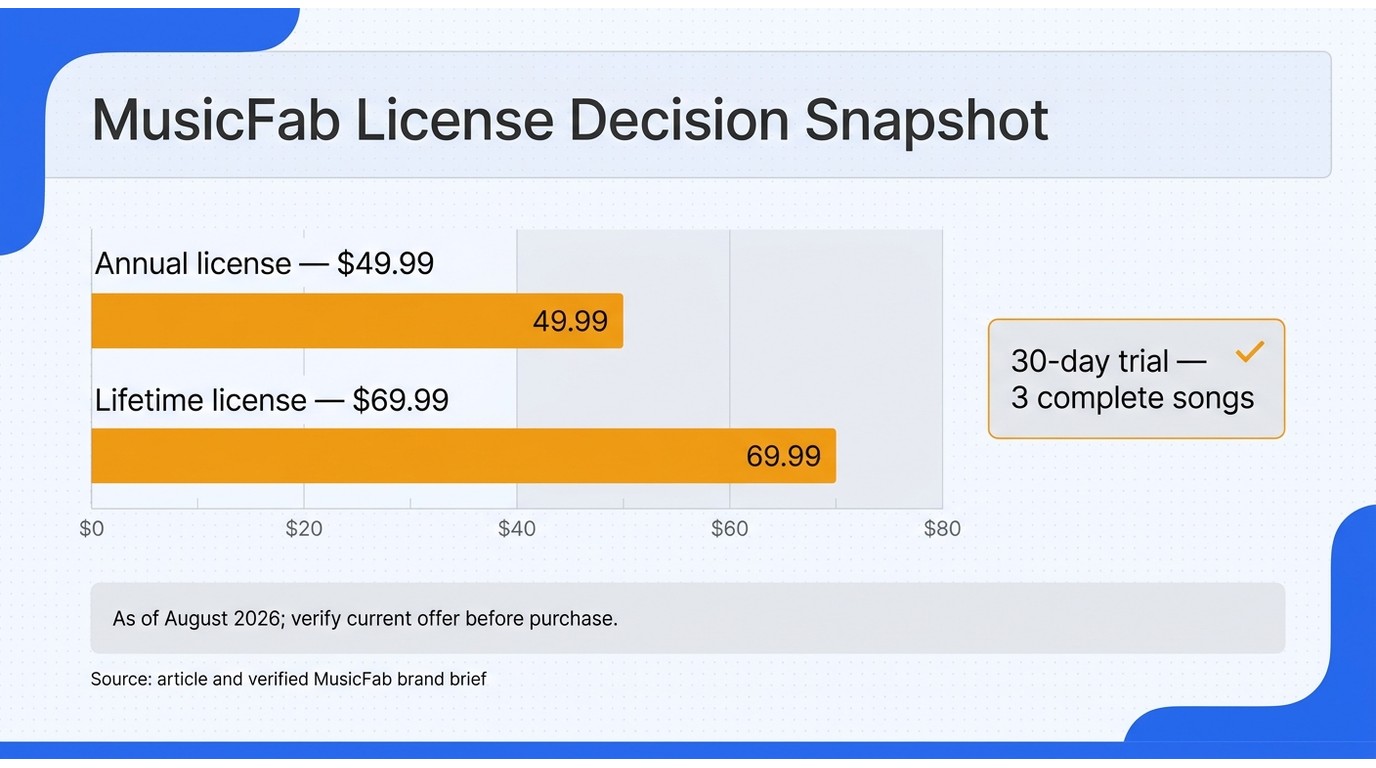
As of August 2026, the 30-day free trial allows three complete SoundCloud songs; the SoundCloud Converter costs $49.99 per year or $69.99 for a lifetime license. After the trial, this is paid desktop software.
Use the three songs as a decision test, then inspect format, tags, artwork, order, and playback. If one official download solves the job, skip the purchase. Repeated playlist work gives the desktop license a clearer purpose.
FAQs
Is SoundCloud Enhanced Pro Still Maintained, and What Should I Check Before Installing It?
Its Chrome Web Store listing is active and advertises MP3 and Opus choices, ID3 tags, cover art, download history, and batches of ten selected tracks. Before installing, check the listing's latest update, requested permissions, privacy disclosure, and recent support activity. Then save one authorized track and confirm that the button, file, tags, and removal process behave as described.
Can a SoundCloud Downloader Extension Work in Firefox or Opera?
Sometimes, but never assume a Chrome package transfers unchanged. Opera can run some Chromium extensions, while Firefox generally needs its own compatible add-on or installation route. Safari support is a separate question, and a GitHub repository is code availability rather than proof of a maintained browser build. An online converter avoids extension compatibility, but it introduces its own privacy, ad, and file-quality tradeoffs.
Is It Safe to Sign In Inside a SoundCloud Downloader?
Reputable, maintained tools that open SoundCloud's legitimate sign-in flow are a better bet than no-name pages asking for credentials directly. Use a unique password, enable available account protections, grant only necessary browser permissions, and remove tools you no longer use. For public tracks, prefer a workflow that does not request account access unless the feature truly needs it.
When Is Downloading SoundCloud Music Permitted?
The clearest cases are your own uploads, an artist-enabled download, or explicit permission from the rights holder. Other personal-copying situations depend on local law and SoundCloud's terms. A platform-terms violation and copyright infringement are not the same legal category, and redistributing or selling saved music creates a different risk from private offline use. When in doubt, use the official download or ask the creator.
Conclusion
For occasional authorized tracks, a SoundCloud downloader Chrome extension is usually enough. For playlists, repeated downloads, format control, and reliable metadata, a desktop tool such as MusicFab SoundCloud Converter is the more practical choice.
Whichever method you use, start with a small sample and verify the actual audio quality, tags, artwork, and playback compatibility. The best SoundCloud downloader is the one that fits your workflow without creating extra cleanup later.

This guide separates SoundCloud app-based offline listening from authorized local audio files on iPhone. It covers Go/Go+, Safari-to-Files, a desktop transfer workflow, Apple Music import, storage troubleshooting, and permission-first choices.
By Jane Chen - Aug 26, 2026
SoundCloud to WAV converter guide: learn how to verify real WAV files, follow creator permissions, compare active browser options.
By Jane Chen - Aug 26, 2026
This guide separates four practical PC download methods from two secondary technical alternatives. It explains SoundCloud's artist-enabled file option, source-quality limits, batch verification, online safety, and when a desktop workflow makes sense.
By Jane Chen - Aug 26, 2026
Learn how to download SoundCloud on Android, including Go and Go+ offline saves, artist-authorized files, downloader categories, file locations.
By Jane Chen - Aug 26, 2026