
YouTube Music Audio Quality in 2026: Bitrates, Lossless, Settings

Table of Contents
Here's the short answer: 256 kbps isn't really the answer to YouTube Music sound quality; your settings chain is. I've spent years A/B-ing streaming tiers on AAC earbuds and wired cans, and the same track can swing from crisp to muddy depending on which quality toggle you flipped, whether your phone re-encoded it over Bluetooth, or which version of the upload the app served you.
This guide walks through what YouTube Music actually caps at, how AAC and OPUS compare to Spotify and Apple Music (both now with lossless), where the real settings live for Wi-Fi, mobile data, and downloads, and why the same 256 kbps track can sound different depending on your playback chain. As of August 2026, here's how it all shakes out.
YouTube Music Audio Quality in 2026
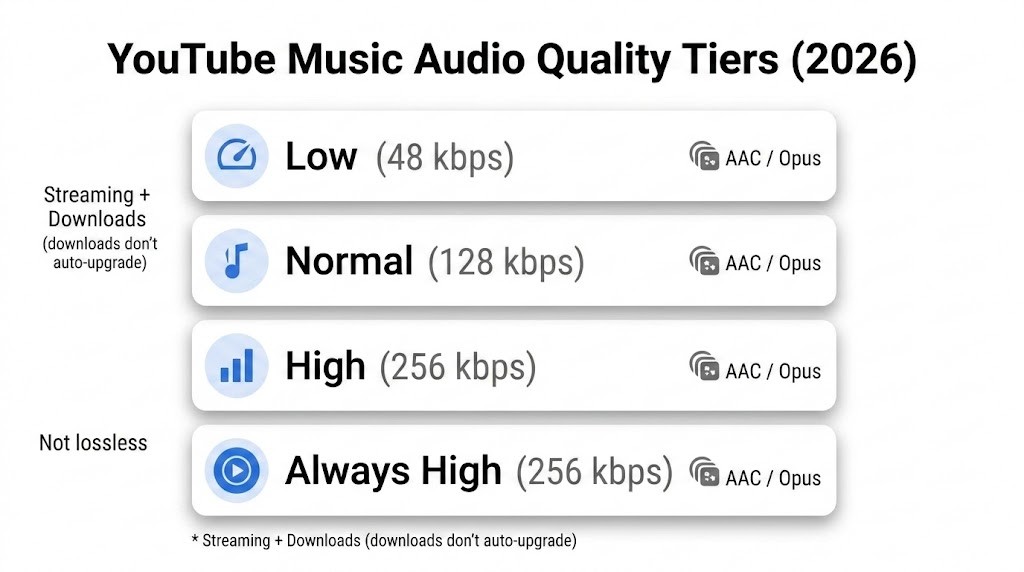
| Mode | Setting | Upper bound | What it means for you |
|---|---|---|---|
| Streaming (mobile data / Wi-Fi) | Low | 48 kbps | smallest data use, lowest fidelity |
| Streaming (mobile data / Wi-Fi) | Normal (default) | 128 kbps | balanced, often what you hear by default |
| Streaming (mobile data / Wi-Fi) | High | 256 kbps | best YouTube Music streaming quality |
| Streaming (mobile data / Wi-Fi) | Always high | 256 kbps | reduces quality drops during weaker connections |
| Downloads (offline) | Low / Normal / High | 48 / 128 / 256 kbps | affects future downloads; old downloads don’t auto-upgrade |
YouTube Music's highest selectable quality is 256 kbps using AAC & OPUS, available to eligible Premium listeners on the High and Always High tiers. Free listeners are held to normal (128 kbps by default), and the service has no native 320 kbps tier and no lossless option, unlike Apple Music and, since September 2025, Spotify Premium. Changing the app setting matters more than chasing a bigger output number, because 256 kbps is the ceiling of what leaves Google's servers.
Key Takeaways:
- Maximum Bitrate: Capped at 256 kbps for Premium subscribers using either highly efficient AAC or OPUS codecs.
- No Lossless Audio: The platform entirely lacks support for uncompressed, high-fidelity formats like FLAC, WAV, or ALAC.
- Hidden Default Cap: By default, YouTube Music restricts mobile data and Wi-Fi streaming quality to just 128kbps to conserve bandwidth. Users must manually navigate the application settings to force the highest available audio output.
AAC and OPUS: YouTube Music Codecs
Google's own documentation lists the selectable YouTube Music quality tiers as AAC & OPUS, without committing to a fixed device split. In practice, which codec you receive can vary by app version, platform, and session, so treating AAC as strictly mobile and OPUS as strictly web overstates what's actually documented.
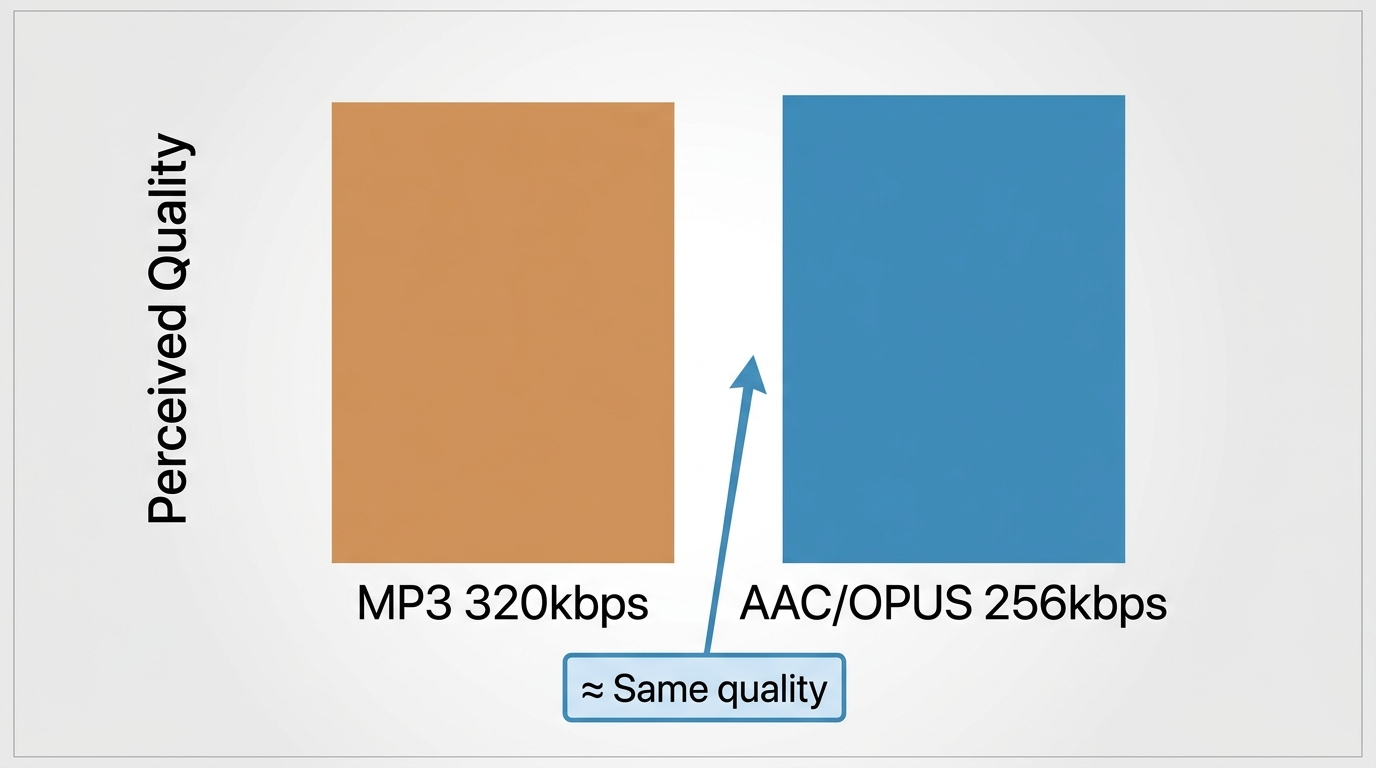
What does matter is codec efficiency. Both AAC and OPUS use modern psychoacoustic models that outperform older formats like MP3 at the same bitrate, allocating more bits to frequencies your ear actually catches. That's why a 256 kbps AAC or OPUS stream can hold up well against a 320 kbps Ogg Vorbis file for typical listening; the compression math matters, not just the label on the tier.
My take: codec efficiency makes raw bitrate comparisons incomplete, not meaningless. It's still useful information; just don't stop at the number.
YouTube Music vs. Spotify vs. Apple Music Audio Quality
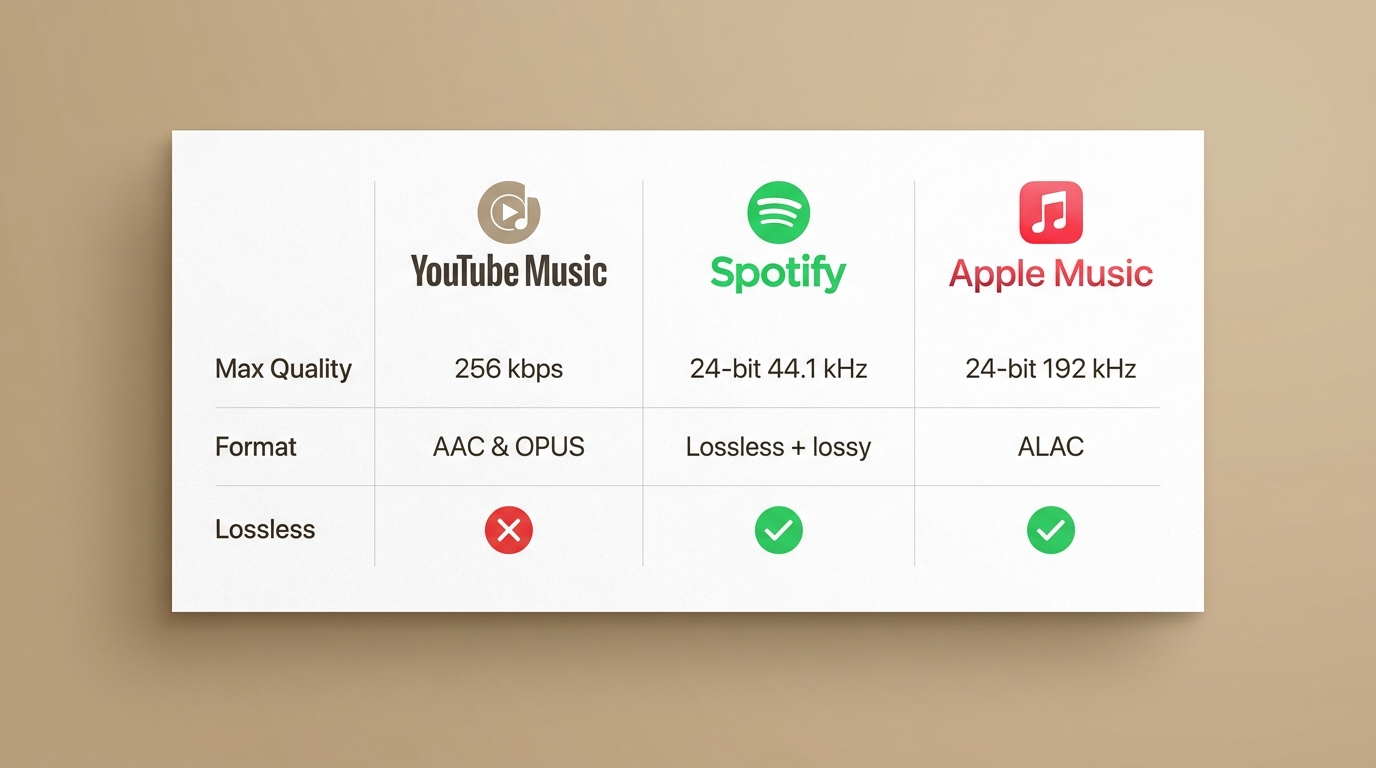
The three-way comparison shifted meaningfully in September 2025, when Spotify Premium added a lossless option. YouTube Music is now the only one of the three without a native lossless tier, but whether that gap matters depends on your playback chain.
| Service | Highest selectable quality | Format | Free vs. paid | Best fit |
|---|---|---|---|---|
| YouTube Music | 256 kbps | AAC & OPUS (lossy) | Free capped lower; 256 kbps requires Premium | Everyday listening on phones and Bluetooth earbuds |
| Spotify | Up to 24-bit/44.1 kHz | Lossless (Premium) or lossy at lower tiers | Lossless is Premium only, on supported devices | Listeners who want lossless without buying into the Apple ecosystem |
| Apple Music | Up to 24-bit/192 kHz | ALAC (lossless / Hi-Res Lossless) | Lossless included at no extra cost with the standard subscription | Wired setups with a capable DAC or supported hardware |
On the codec math, AAC is generally more efficient than Ogg Vorbis, so YouTube Music at 256 kbps often trades punches with Spotify's older 320 kbps lossy setting. Now that Spotify has a real lossless option and Apple Music continues to offer ALAC up to hi-res, the honest read is YouTube Music can absolutely satisfy Bluetooth and casual listening, but if native lossless is your bar and your hardware can actually deliver it, one of the other two is a cleaner fit.
YouTube Music Audio Settings for Best Sound
YouTube Music splits quality controls across three separate places, Wi-Fi streaming, mobile network streaming, and downloads, and each one defaults to Normal. If you never open the settings, you're listening at 128 kbps regardless of your subscription.
Wi-Fi streaming quality
- Open YouTube Music → tap your profile picture.
- Go to Settings → Data saving → Audio quality on Wi-Fi.
- Choose High for the 256 kbps ceiling when Wi-Fi is solid.
Mobile network quality
- In Settings → Data saving, tap Audio quality on mobile network.
- Pick High to reach 256 kbps when the signal allows, or Always high to hold the ceiling even on weaker connections.
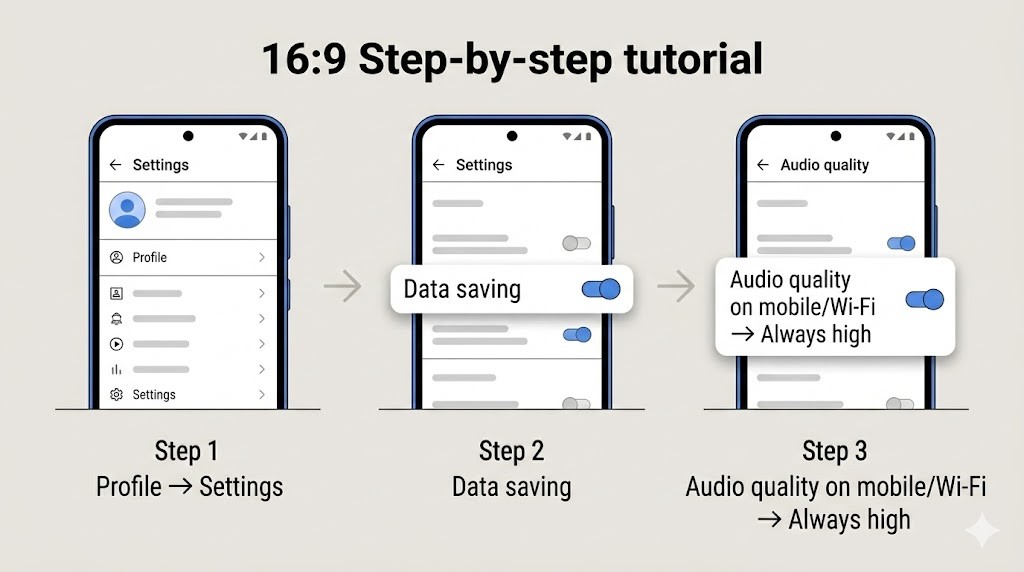
Always High is worth it when consistency matters — long commutes, subway dips, moving between rooms — but it isn't the default I'd recommend to everyone. If you're on a metered plan, High is the smarter compromise; the app will still ease off on genuinely bad connections.
Download quality and re-downloading
- In Settings, open Downloads & storage → Audio quality.
- Set high for the best offline files going forward.
Changing this setting applies to future downloads only. Anything you saved at low or normal stays at that quality until you delete it and download again; the app won't quietly upgrade your existing library.
YouTube Audio Quality for Videos vs YouTube Music
1) YouTube video audio bitrate is adaptive
YouTube often serves different audio streams depending on the following:
- your device and browser/app,
- current network conditions,
- the stream variant you're getting in that moment,
- and, often overlooked, which upload you're actually playing. The official audio, the music video, and the same track pulled into an album view on YouTube Music can each come from different masters with different loudness and mastering choices.
That's why a "fixed YouTube audio bitrate" number can be misleading and why the same song can sound different when you jump from a music video to the YouTube Music album view. A better strategy is to check your actual stream.
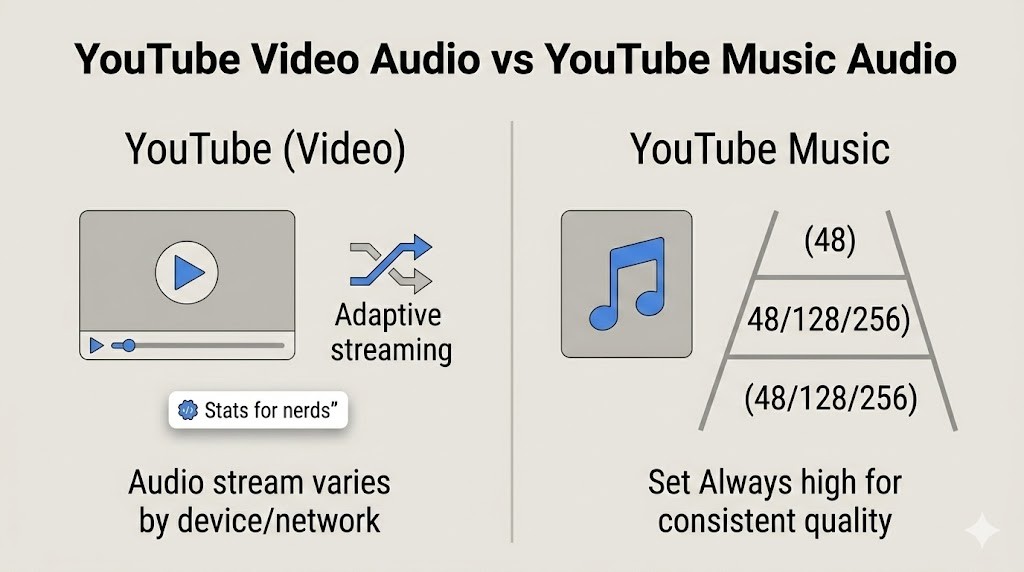
2) How to check YouTube bitrate audio using “Stats for nerds”
On many devices, YouTube exposes a built-in diagnostic panel:
YouTube on TV
- While a video is playing, open Settings.
- Turn on Stats for nerds.
- Go back to the video to see the overlay.
YouTube app (mobile)
- Tap your account icon → Settings → General.
- Enable stats for nerds.
- Play a video → tap More → tap the Stats pulse icon.
Mobile web player
- Tap and hold the player → select Stats for nerds.
Once it’s on, look for the line that lists codecs and related stream details. This is the most reliable way to sanity-check your actual YouTube audio quality.
3) YouTube's “Stable volume” can change perceived audio on videos
By default, YouTube may have stable volume turned on for videos to reduce loud/quiet swings. If you feel like a video sounds “flattened” or inconsistent, check the player settings.
Note: Stable volume is turned off for YouTube Music and official music videos—so this is mainly a YouTube (video) issue, not a YouTube Music issue.
4) Bluetooth, EQ, and the playback chain
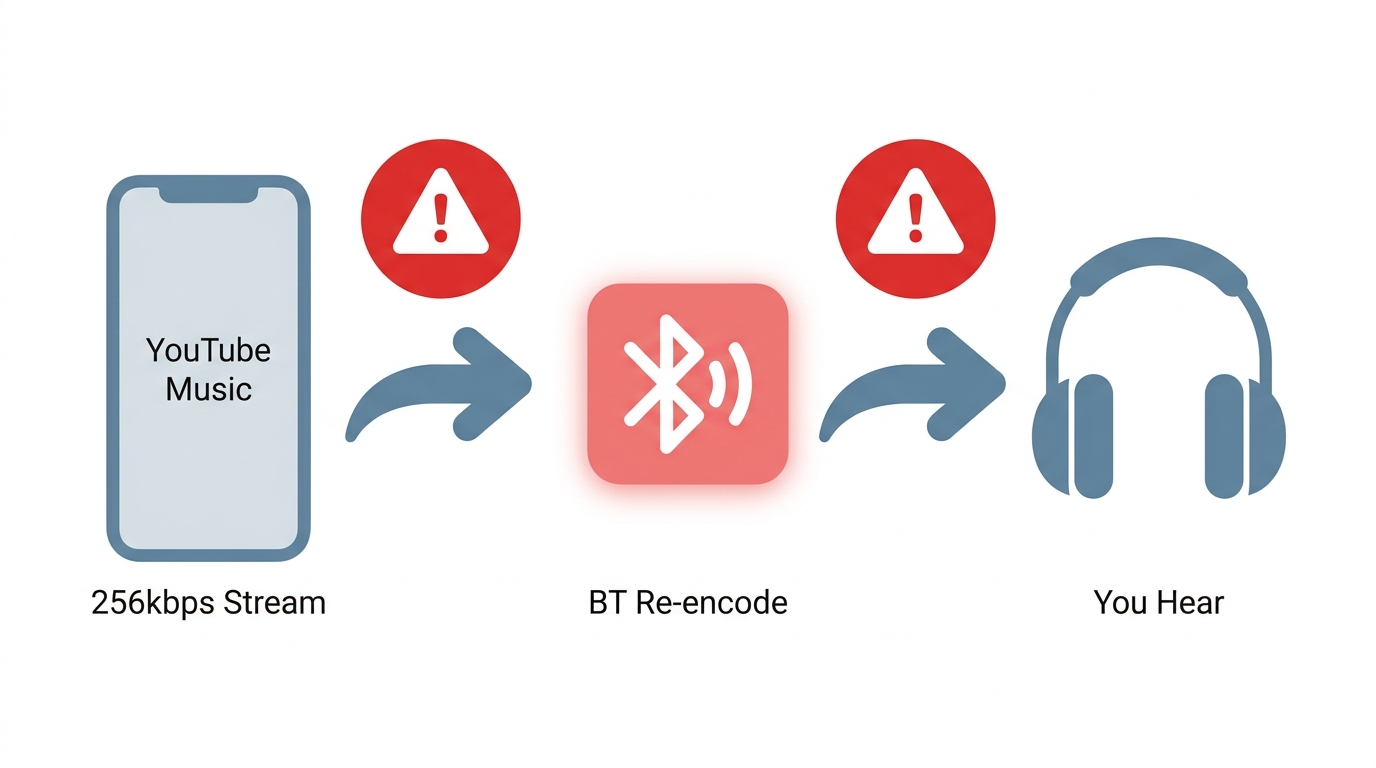
When two songs sound different on the same service at the same setting, the service usually isn't the culprit; the chain downstream is. Before blaming YouTube Music's 256 kbps ceiling, walk through this order:
- Source version. Is this the official audio, the music video, or an album track? Different uploads, different masters.
- App quality setting. Wi-Fi, mobile, and download settings are separate — one may still be on Normal.
- Bluetooth re-encoding. Your phone decodes the lossy AAC or OPUS stream and re-encodes it to a Bluetooth codec (SBC, AAC, aptX, or LDAC) before it reaches your earbuds. That's lossy-to-lossy, and the second hop varies by device pairing.
- Normalization and EQ. Loudness normalization inside the app, plus any system-level EQ, changes what your ear registers as "quality."
- Headphones or DAC. Cheap earbuds and a $500 IEM with a wired DAC won't tell you the same story about the same stream.
In my own listening, the difference between AirPods and wired studio cans on a 256 kbps YouTube Music track is dramatic — much bigger than the difference between 256 kbps AAC and 320 kbps Ogg Vorbis on the same headphones. Fix the chain before you switch services.
Source-Aware Formats for Saved Music
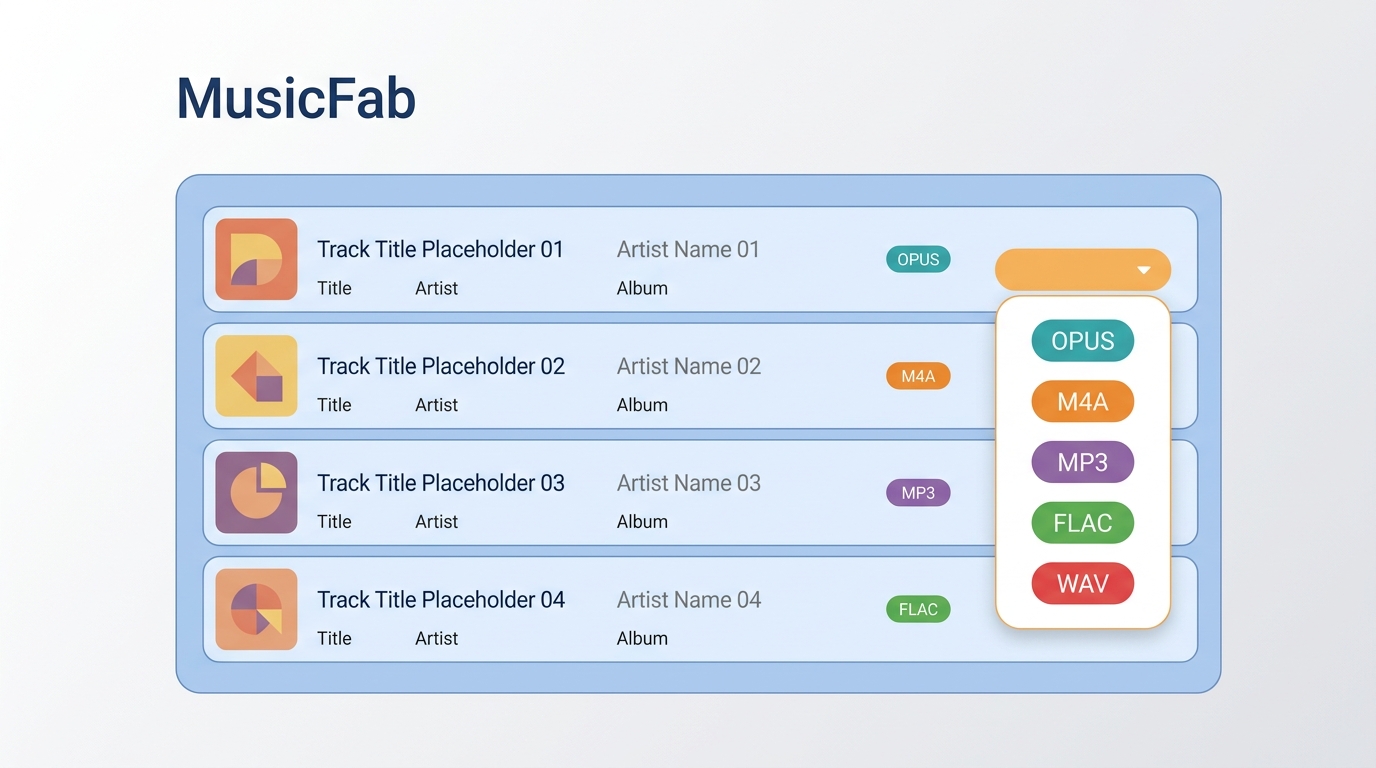
For content you're authorized to access, where permitted by platform terms and applicable law, an authorized personal-use local-file workflow can be useful when you need organized offline files outside the app. The important thing to understand up front: no output format can add information that wasn't in the source stream. YouTube Music tops out at 256 kbps lossy, so "save as FLAC" gives you a bigger file, not a better one.
The format choice is really about intent: preserve the source or maximize compatibility.
- OPUS or M4A — closest to the source, since YouTube Music's own delivery is AAC & OPUS. Best when you want the original encoding preserved without an extra transcode step.
- MP3 — universal compatibility for older players and car stereos, with a small transcode loss from the already-lossy source.
- FLAC or WAV — useful when a device or DJ tool expects those containers, but again: a lossless container around a lossy source doesn't recover discarded data.
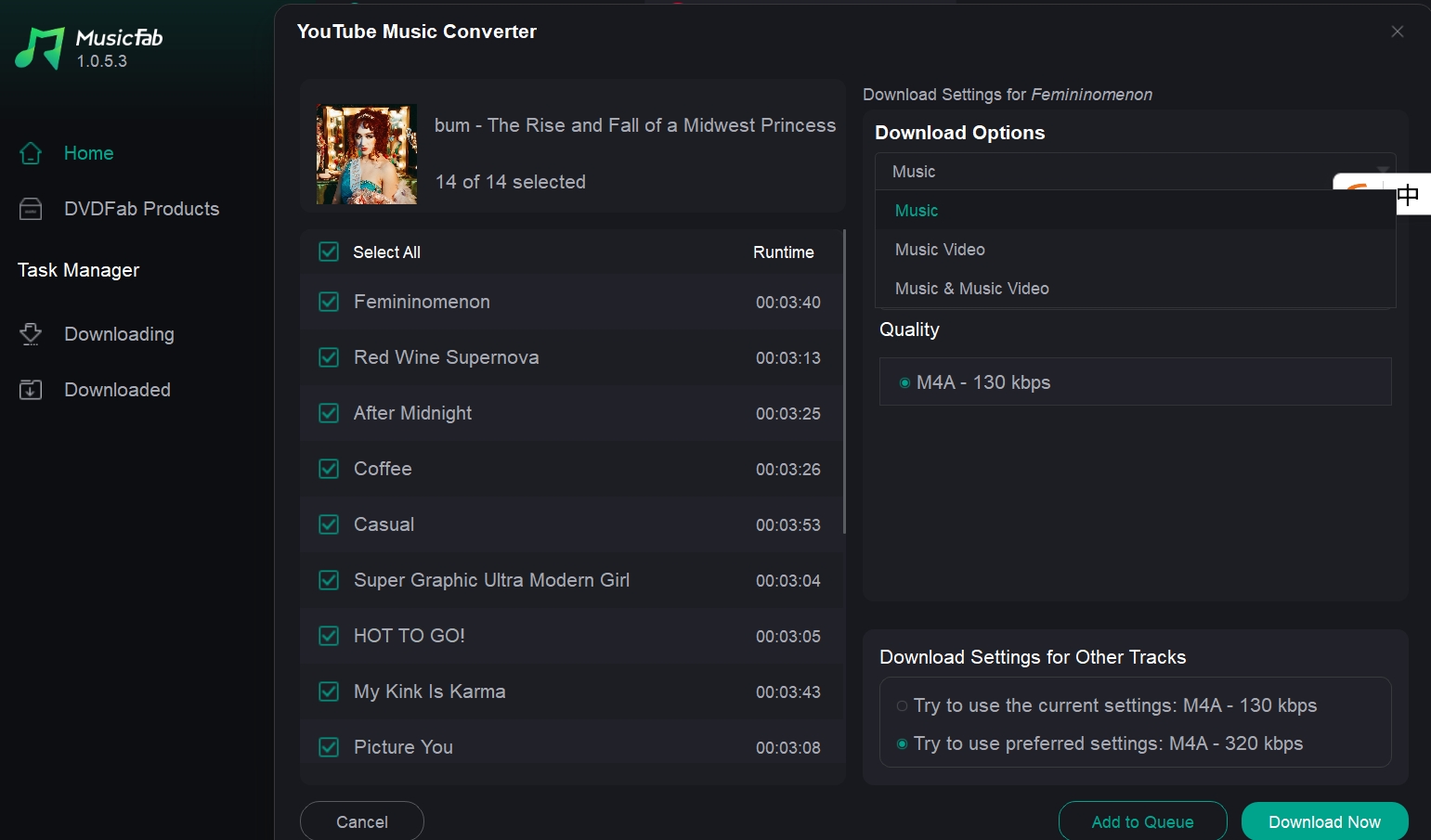
If you're downloading music from YouTube Music to your computer, MusicFab YouTube Music Converter is a desktop app for Windows and Mac that batches playlists in native OPUS or M4A alongside MP3, FLAC, and WAV at up to 20x, preserving ID3 tags, cover art, and .lrc lyrics so the files land in your library already tagged. That last part matters more than it sounds — untagged folders of 300 tracks are their own kind of hell.
Who this suits and who it doesn't
It's a fit if you're on Windows or Mac, want organized local files for backup or cross-device playback, and are comfortable managing an authorized personal library. It's not the right tool if all you need is official in-app offline playback. YouTube Music's built-in download setting handles that without leaving the app, and it's the simpler path when you just want your commute playlist saved for the subway. For everything beyond that, being able to listen to YouTube Music offline as portable files is the real advantage.
FAQs
Q1. Can YouTube Music sound better than Spotify at a lower bitrate?
Sometimes, when comparing lossy to lossy. YouTube Music's 256 kbps AAC is more efficient per bit than Spotify's 320 kbps Ogg Vorbis, and factors like the source master, in-app normalization, and your playback chain often outweigh the bitrate gap. But this only applies to Spotify's lossy setting. Spotify Premium's Lossless option (up to 24-bit/44.1 kHz on supported devices) is a different category, and on a compatible chain it will out-resolve any 256 kbps stream.
Q2. Does YouTube Music offer a native 320 kbps tier?
No. The highest selectable setting is 256 kbps using AAC & OPUS, available on High and Always High for eligible premium listeners. If a downloader tool advertises a 320 kbps output for YouTube Music tracks, the extra headroom is transcode padding. It can't add detail the 256 kbps source never had.
Q3. Does saving YouTube Music as FLAC make it lossless?
No, "lossless" means no data was discarded during compression, and a 256 kbps AAC or OPUS stream has already dropped that data before it reaches your device. Wrapping it in a FLAC container gives you a bigger file with the same audible information, not a recovered master. If you want the closest match to what the app actually plays, choose OPUS or M4A instead—those preserve the source encoding without a second transcode. FLAC and WAV are compatibility choices, not quality upgrades in this context.
Final Verdict
Back to where we started: 256 kbps isn't really the answer to YouTube Music sound quality—your settings chain is. YouTube Music remains a 256 kbps AAC & OPUS service with no native lossless tier, while Spotify and Apple Music now both offer lossless on compatible playback chains. For most Bluetooth and everyday listening, that gap is smaller than it looks; for wired setups with a capable DAC, it's real.
Before you switch services, check the three separate quality controls (Wi-Fi, mobile, and downloads), then walk down the playback chain—Bluetooth codec, normalization, and headphones. That's usually where the answer lives. For an authorized personal-use local-file workflow, options like MusicFab or a comparable YouTube Music playlist downloader can fit alongside the app, provided you stay within platform terms and applicable law.

Download YouTube Music to a computer with a clear look at official mobile-only downloads, desktop local-file options, format choices.
By Jane Chen - Aug 26, 2026

This guide separates a converter's live page, completed conversion, and verified .m4a file. It compares six browser tools using current status and prior outcomes, explains how to inspect the container and codec, and outlines desktop workflows for single videos and playlists.
By Jane Chen - Aug 19, 2026
Compare six YouTube Music playlist downloaders for desktop, online, and command-line use. See full-playlist support, MP3 output limits, metadata, safety signals
By Jane Chen - Aug 12, 2026
Learn how YouTube Music offline listening works in the app, where downloads are stored, and how app downloads differ from transferable local audio files.
By Jane Chen - Aug 9, 2026